
Microsoft Teams VoIP Phone System


VoIP Phone System That Integrates with Microsoft Teams
Business-Grade VoIP Calling That Works Seamlessly with Microsoft Teams
Microsoft Teams has become the central hub for collaboration — messaging, meetings, file sharing — but to handle full business phone calls, it needs telephony integration. That’s where a VoIP phone system like RingCentral comes in.
By embedding a cloud phone system into Teams, you enable your team to:
- Make and receive external calls through a business number
- Use advanced PBX features inside the Teams interface
- Keep one platform for calls, chat, meetings and mobile voice
- Scale effortlessly with your business growth
Key Benefits of a VoIP Phone System with Teams
Seamless Calling within Teams
With RingCentral integrated, users can call directly from the Teams app — desktop and mobile — without switching platforms. All telephony and presence information lives in one place.
No Teams Phone License Required
Unlike Microsoft’s native calling plans, RingCentral’s integration allows voice calling without the extra cost of Teams Phone licences, saving you money and complexity.
Enterprise-Grade Features Built In
Your Teams users gain powerful VoIP features such as:
- Automatic and On-demand Call recording
- IVR & automated attendants
- Call queues and monitoring (whisper/barge)
- Advanced analytics and reporting
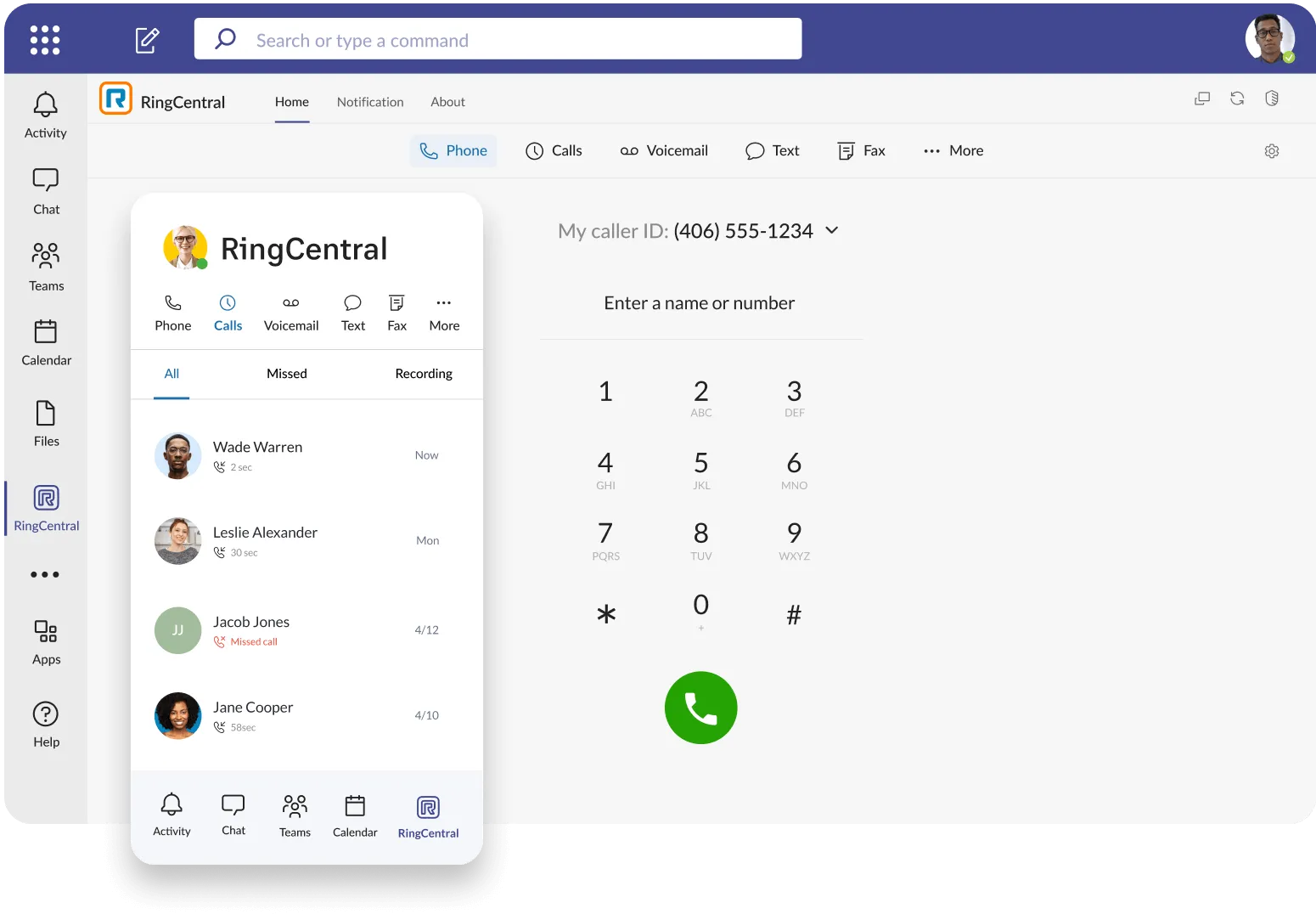
VoIP Embedded App in Teams
The embedded RingCentral app brings telephony into your Microsoft Teams interface. Users can dial, view call history, voicemail or manage calls entirely from within Teams.
Direct Routing Option
For organisations that need a more traditional dialling experience — especially larger companies — Direct Routing lets RingCentral power calls while letting users stay in the Teams UI.
Works with All Devices
Whether your team uses mobile, desktop, or desk phones, the VoIP system routes calls efficiently and consistently. All telephony controls sync with Teams presence and status.
RingCentral for Microsoft Teams
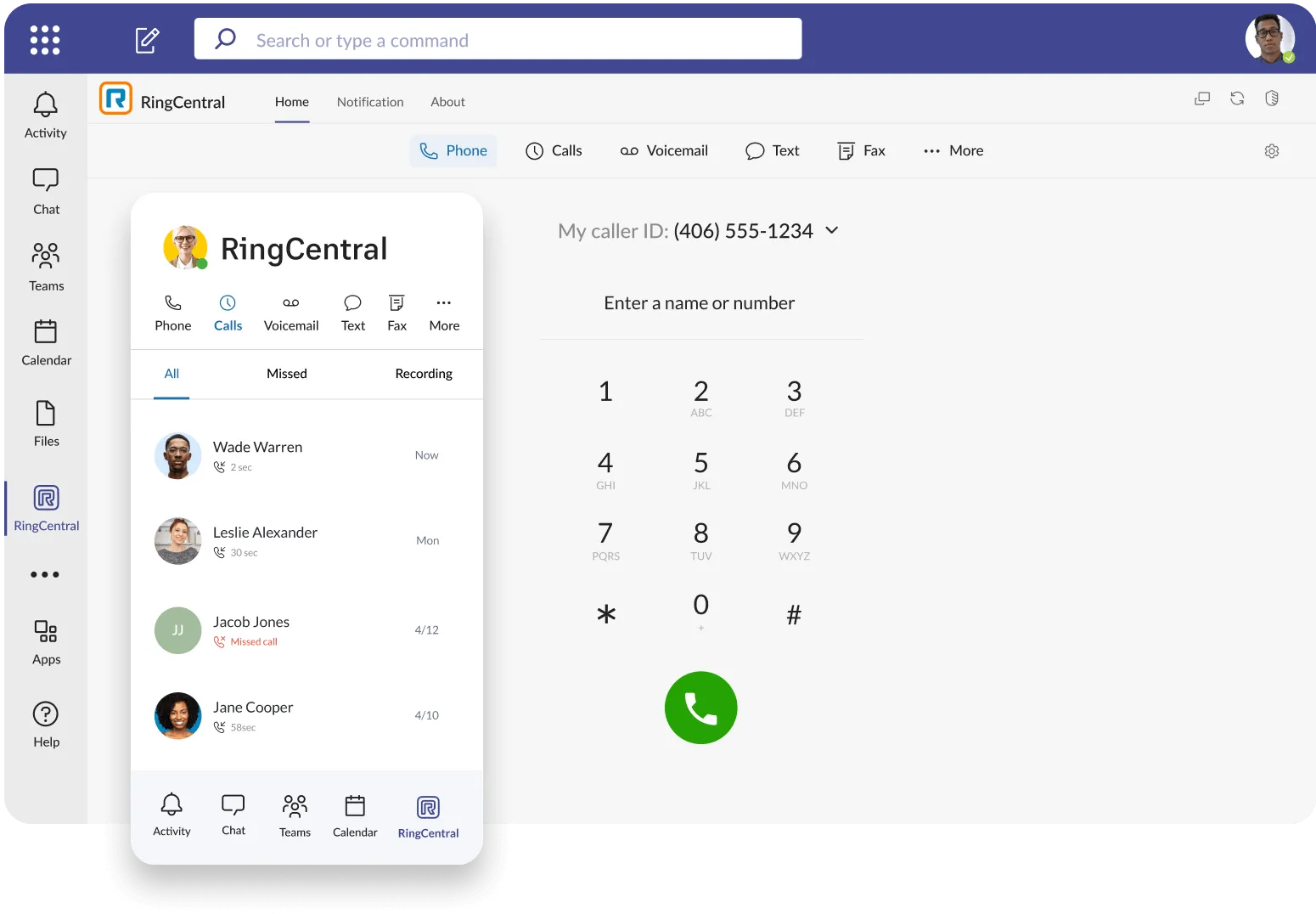
RingCentral for Microsoft Teams turbocharges your Teams deployment with a market-leading cloud business phone. Highly reliable telephony, advanced calling features, and market-leading analytics transform Teams into a powerful communications hub. With RingCentral for Microsoft Teams embedded app, you’ll get:
Our AI solutions work seamlessly across:
- One number for all your communication needs: Get phone, fax with a single number, all available in Microsoft Teams
- Integrated into Teams and all your devices: Extend telephony into Microsoft Teams, desk phones, and mobile devices from one trusted partner
- Robust call controls for power users: Get the advanced call capabilities to satisfy the needs of sales people, support staff, and other phone power users
- Heads-up display: Get a smart sidecar panel for quick access to key contacts and advanced call features
- Bi-directional presence sync for accurate user availability: Presence status is automatically detected and synced between Microsoft Teams and RingCentral, including hard phones, helping users avoid needless interruptions
- secure, compliant 99.999% uptime: RingCentral’s market-leading 99.999% uptime (less than 6 mins of annual downtime) ensures business doesn’t stop

Why Choose Softext for RingCentral VoIP Integrations
Softext helps UK businesses turn RingCentral into a fully optimised, business-ready VoIP phone system — not just another tool. We design and integrate VoIP solutions that work seamlessly with Microsoft Teams and your wider IT environment, so your team can communicate better, faster, and with less friction.
From consultation to go-live and beyond, we handle everything: setup, number porting, call flows, integrations and ongoing optimisation. You’ll get clear, UK-based support, expert guidance, and a single partner accountable for performance, reliability and results.
Ready to upgrade your phone system?
Speak to a VoIP specialist today and see how a RingCentral integration with Microsoft Teams can improve productivity, customer experience and control costs.
RingCentral with Microsoft Teams FAQ
Yes — RingCentral’s solution lets your team make external calls in Teams without buying Microsoft Teams Phone licences.
Advanced calling features — including call recording, call queues, IVR, analytics and fax — integrate straight into your Teams experience.
Yes — RingCentral’s integration supports traditional desk phones as well as the Teams app.
RingCentral integrates via a native embedded app or direct routing. The embedded app allows calling and telephony features inside Teams, and direct routing powers Teams’ dialing natively while RingCentral provides the underlying cloud PBX capabilities.
Yes — once integrated, RingCentral VoIP calling works across Microsoft Teams on desktop, web, and mobile, keeping your communication seamless on any device.
Yes, user presence (e.g., Available, Busy, In a Meeting) can sync between Microsoft Teams and RingCentral, helping ensure call routing and status consistency.